
Automatic sync
Connect an automatic feed from the broker and forget about it. Holdings, trades and cash stay current.
Connect Snowball Analytics to Claude, Cursor and other AI apps over MCP — the standard way an AI app reaches an outside data source. Or ask inside the product, with Ask Snowball Analytics.
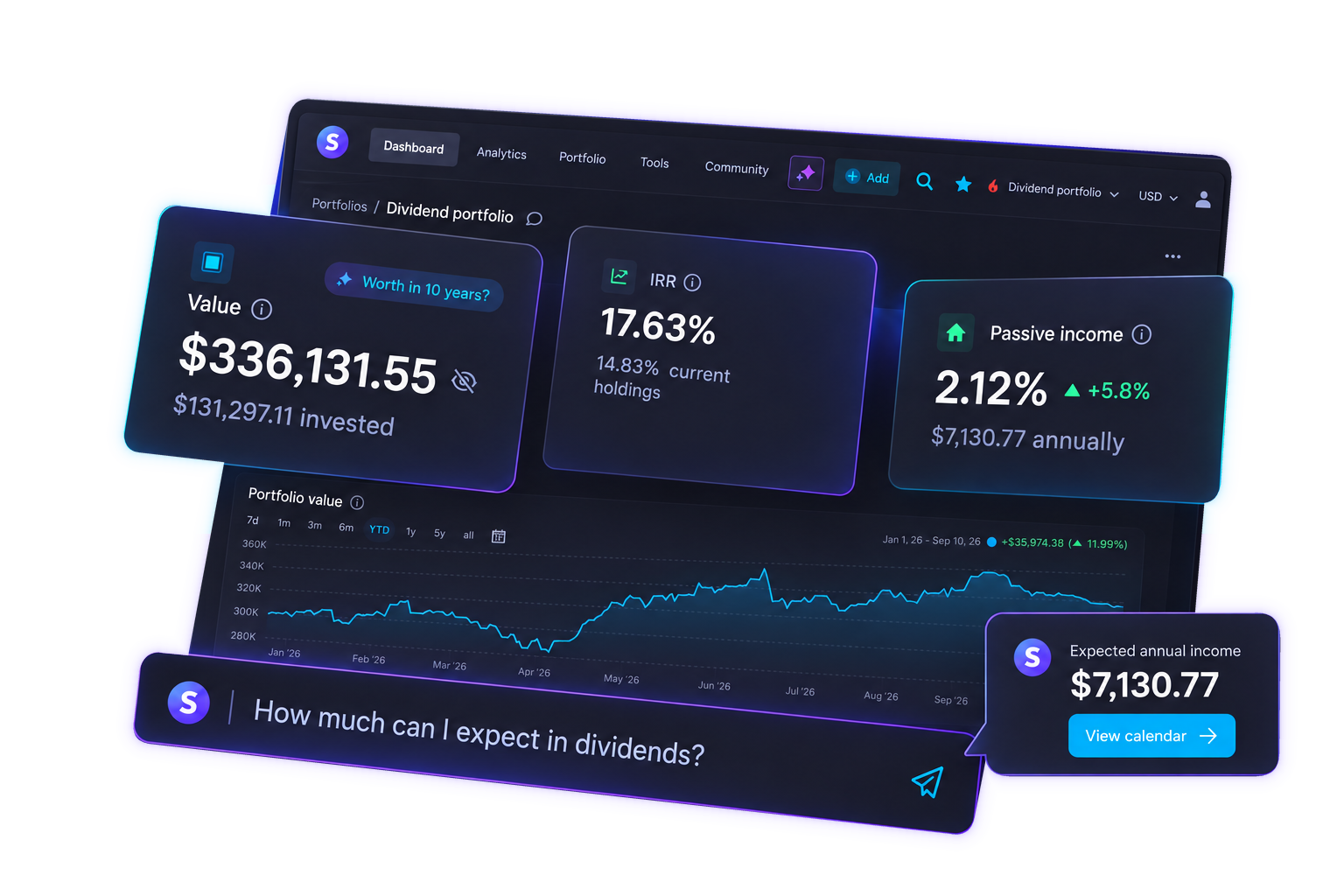
You ask how much you will be paid over the next twelve months, whether the income target is still on track, or how this year has gone and what moved it. The model answers from the market: what a ticker yields, what the price has done. It has never seen your positions, the dividends already on your calendar, or the return from your own trades. Paste a screenshot or type out ten tickers and you are still describing the holdings to something that cannot see them. The answer stays an approximation.
Connect the portfolio you already track in Snowball Analytics. The same calculations flow into Claude, Cursor and other apps over MCP — or into Ask, right inside the product, wherever it suits you. The assistant writes; every figure is calculated here.
 Snowball Analytics
  Claude
  Cursor
  ChatGPT
 The model needs your holdings in context to answer questions about this portfolio. You already track that here, so bringing it into the chat is a one-time setup.
Connect an automatic feed from the broker and forget about it. Holdings, trades and cash stay current.
You can also upload broker reports. That brings in the full history of your investments.
 Fidelity
 Charles Schwab
 Vanguard
 Interactive Brokers
 E*TRADE
 M1 Finance
What you'll be paid next year. How this year went. Whether the income goal is still on track. How concentrated you are. What one holding is doing.
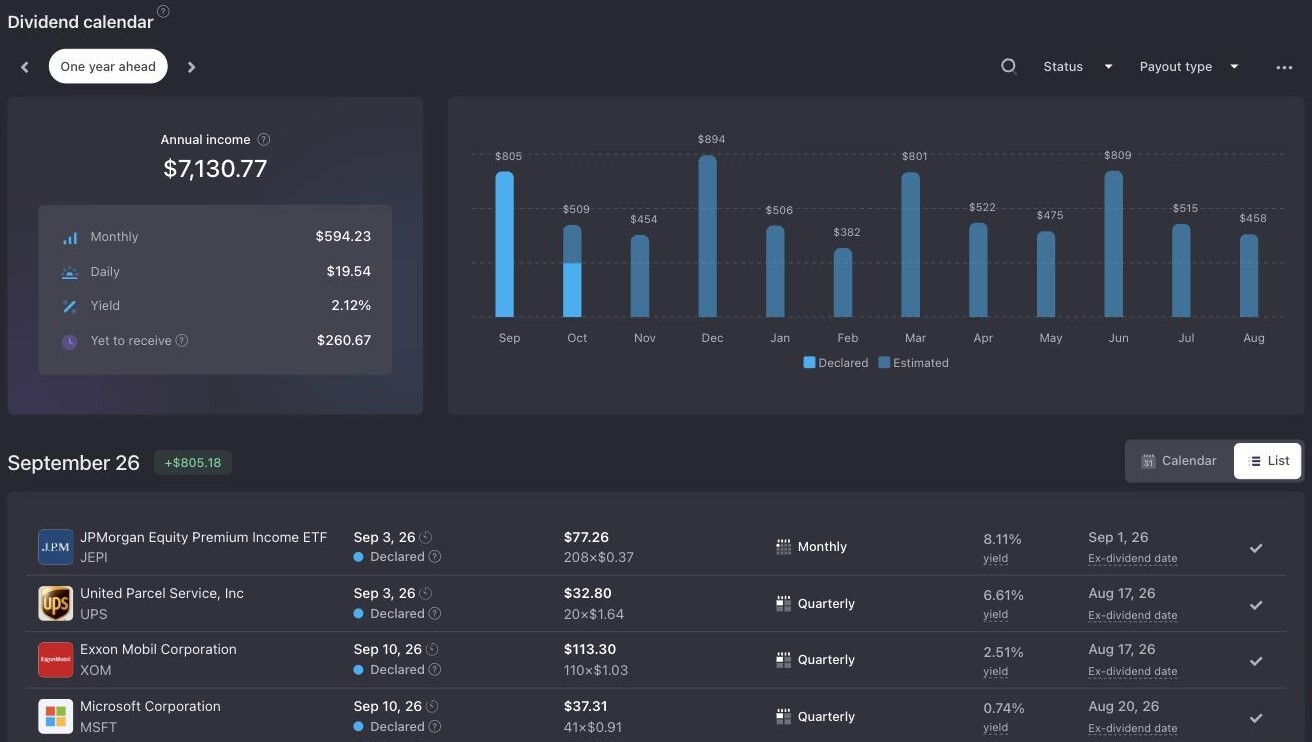
The next twelve months already sit on your dividend calendar. It reads those figures and adds context around them.
Prompt
What dividend income should I expect over the next 12 months, and which months are the weakest?
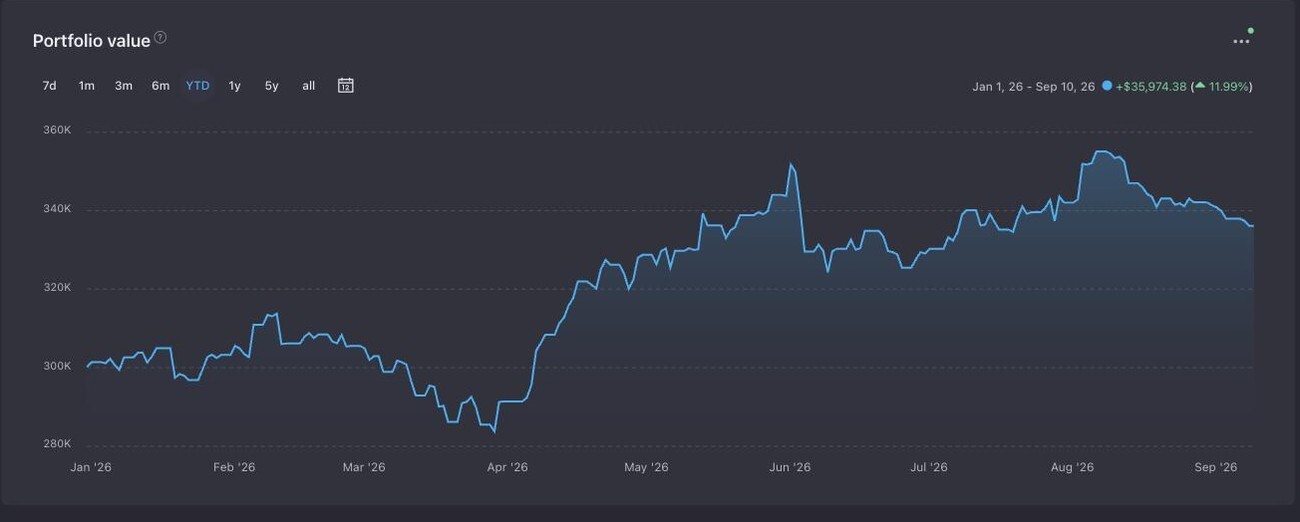
The chart of the year is already in Snowball Analytics. A line on its own is only the shape of the year. The assistant adds the layer on top: which holdings moved it, and where to look.
Prompt
How did my portfolio perform this year, and which holdings moved it the most?
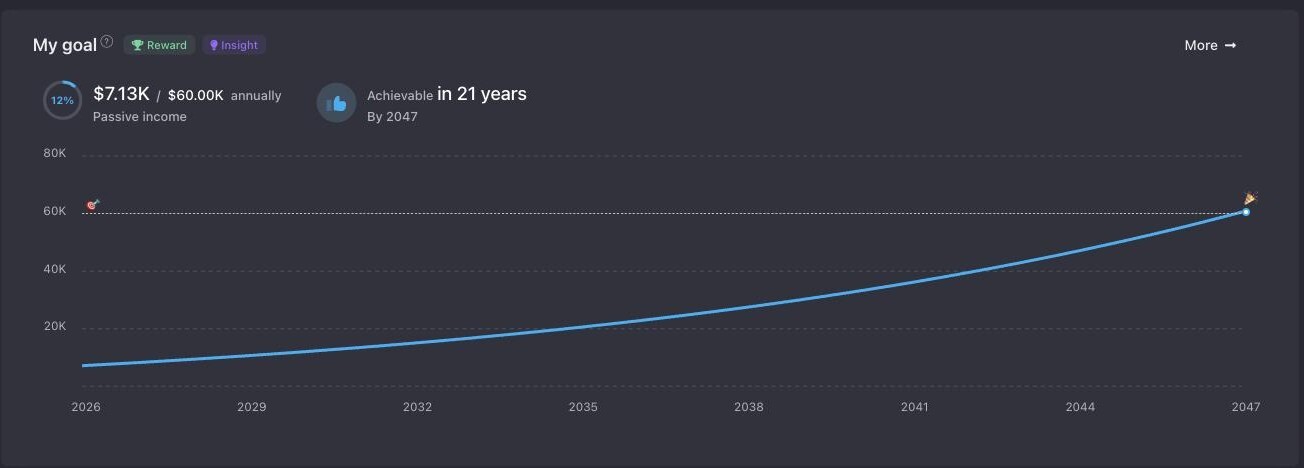
The assistant solves your goal against the path you are actually on: what you hold now, what you add, and what those holdings pay. You get back whether the target is reachable on that path and what the answer depends on.
Prompt
Will my portfolio reach $60,000 a year in passive income, and by when if I keep contributing at the current rate?
Ask for the split and you get your allocation as you have set it up. Concentration you did not intend usually shows up as one name or one sector carrying more of the portfolio than you remember choosing.
Prompt
Break down my allocation by sector and by holding, and point out where a single position dominates.
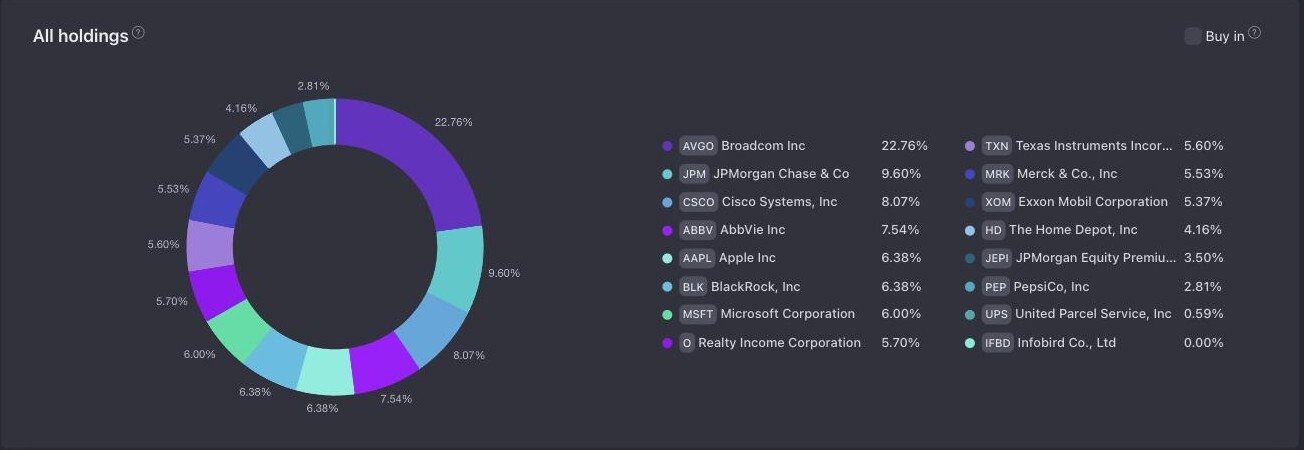
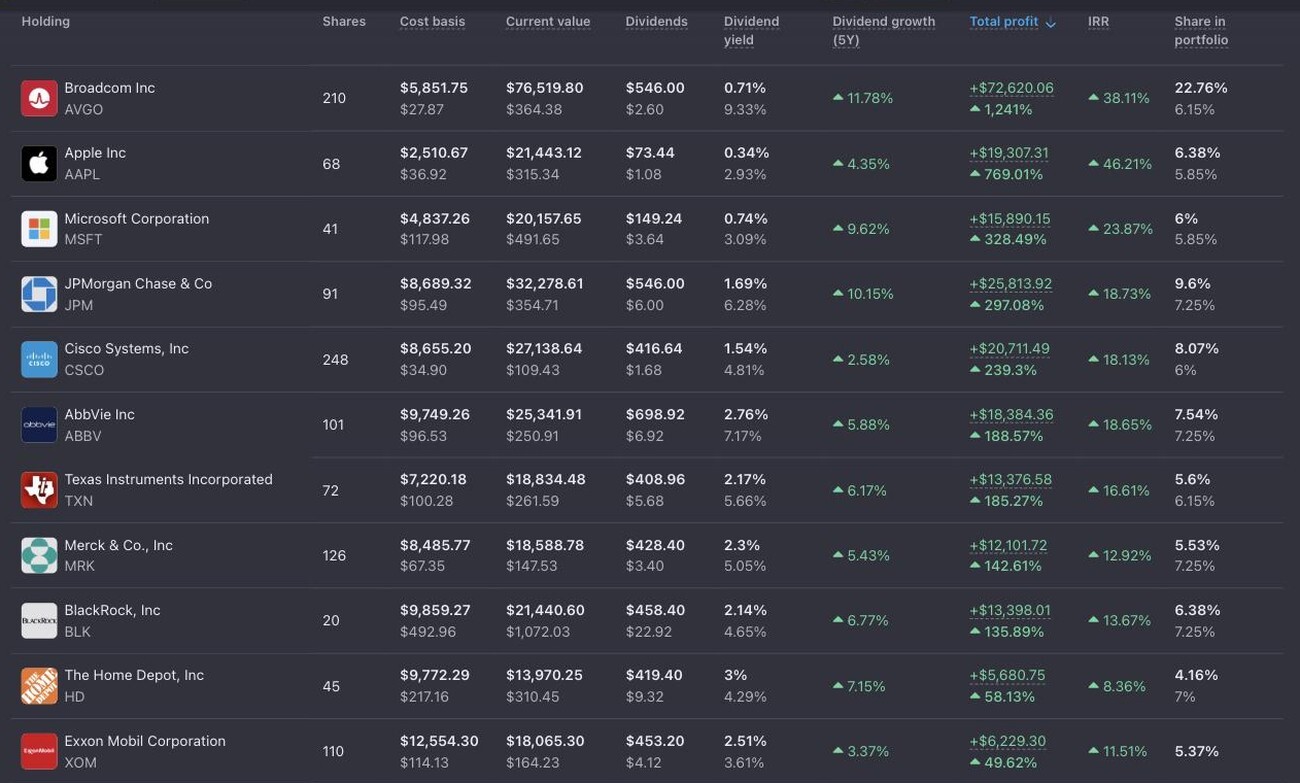
This is where several tools come together in one answer. The assistant takes your position and sets it beside the company's own profile, price history and fundamentals. What comes back describes the holding as you own it.
Prompt
Tell me about my position in CSCO: weight, cost, income, and how the company's fundamentals look.
Fourteen tools, and the same fourteen behind both ways of asking.
These are the same analytics behind everything Snowball Analytics tracks — the chat reads them, it does not invent them.
Snowball Analytics does not provide investment recommendations. The answers describe your own data and leave the decision with you.
Nothing in your portfolio can be bought, sold, added or edited from a chat. Both ways of asking are read-only.
What is sent is anonymized. Snowball Analytics does not use it to train models. In Claude, Cursor or another app, that depends on the app's own settings.
Your MCP key is shown once and stored only as a hash. Regenerate or delete it and the old key stops working immediately. Treat it like a password.
Access
Three steps, and no code.
MCP is part of the Expert plan. Ask Snowball Analytics is available to everyone on the web and in the mobile app, on every plan, with usage limits that depend on the plan. Registration comes with a 14-day free trial that includes paid features, and no credit card is required.
Full steps, app-by-app configuration and troubleshooting are in How to connect Snowball Analytics to Claude, Cursor, and other AI apps.
FAQ
Claude, Cursor, and any other app that supports MCP. The connection uses a key you generate on the MCP tab of your Snowball Analytics profile, together with the server address shown on the same tab. Step-by-step configuration for each app is in the help article.
It can read the portfolio data you already keep in Snowball Analytics — holdings, transactions, dividends, allocation, performance and goals — and nothing else. It is read-only: nothing can be bought, sold, added or edited from a chat. You can regenerate or delete the key at any time, which stops access immediately.
What is sent is anonymized. Snowball Analytics does not use it to train models. In Claude, Cursor or another app, whether the conversation is used for training depends on that app's own settings.
MCP is part of the Expert plan. Ask Snowball Analytics is available to everyone on the web and in the mobile app, on every plan, with usage limits that depend on the plan. Registration comes with a 14-day free trial that includes paid features, and no credit card is required.
No. You generate a key on the MCP tab of your profile and paste it, together with the server address shown next to it, into your AI app's connector settings. That is the whole setup — no code and no API.
No. Snowball Analytics does not provide investment recommendations. The answers describe the data you already keep in Snowball Analytics and give you context for your own decision.
The same portfolio, the same calculations — reached either from the app you already chat in, or from the header of Snowball Analytics itself.
Connect Snowball Analytics to Claude, Cursor, or any other app that supports MCP. You generate a key on the MCP tab of your profile, paste it into the app once, and your portfolio becomes a source the assistant can read. MCP access is part of the Expert plan.
Ask Snowball Analytics is available to everyone on the web and in the mobile app. It works on every plan, and how much you can ask depends on your plan.
Both ways of asking reach the same tools. The assistant understands the question and puts the answer into words; every figure it quotes is calculated by Snowball Analytics from the brokerage accounts you already track here.
Dive deeper into the tools behind the tracker — from stock analysis to dividend planning
Automatically track payouts, calculate Yield on Cost, and project future passive income.
Explore dividend tracker →Avoid yield traps. Analyze financial health, payout ratio and sustainability.
Check dividend ratings →Monitor individual equities, price movements and 10-year company fundamentals.
Explore stock tracker →See exactly when payouts hit your account across all global holdings.
View dividend calendar →Project future passive income, simulate DRIP scenarios and visualize compounding.
Try dividend calculator →Plan trades around upcoming ex-dividend dates to capture the next payout.
View ex-dividend dates →We do not provide investment recommendations. Answers are based on the data you already keep in Snowball Analytics. Ask Snowball Analytics is read-only. Data is anonymized. Snowball Analytics does not use it to train models; other apps follow their own settings.
Rated by thousands of investors